Heart rate missing after a workout transfer? Follow the samples
If a transferred workout has no heart-rate graph, look for timestamped heart-rate samples at each stage, not just an average. A single summary value, such as "average 140 bpm", doesn't show that samples exist. A summary is still useful, but to reproduce a heart-rate chart, or anything else built from the time series, a destination needs the individual readings, each with its own time. Check the recording, the Health permissions, the transferred file and the destination, in that order. The first place you can actually inspect and find no samples is the place to investigate.
Why an average isn't enough
A summary value is one number. A recording app can calculate it, store it with the workout or copy it from elsewhere. A heart-rate stream is a series of readings tied to moments in the workout. Here is a fictional 20-minute workout with one scheduled reading every minute, from minute 0 to minute 20: 21 readings in all.
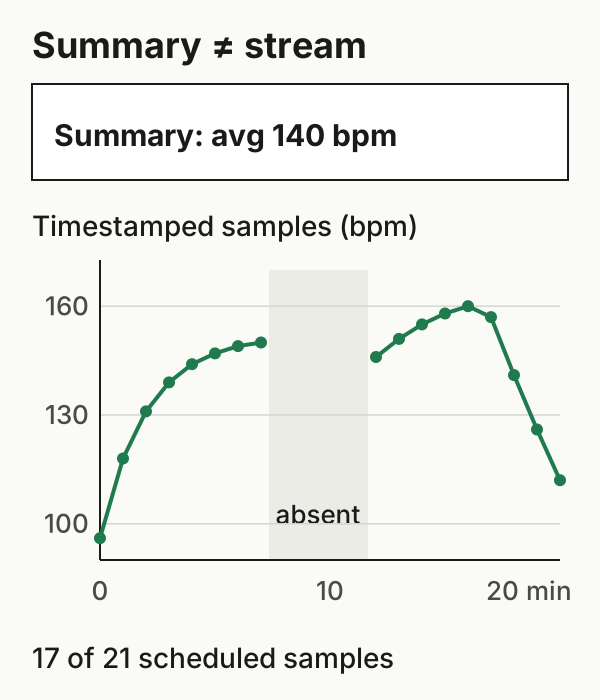
Seventeen of the 21 scheduled readings have a value. Those at minutes 8, 9, 10 and 11 are absent, so the nearest readings either side, at minutes 7 and 12, are five minutes apart. The arithmetic mean of the 17 values is 140.0 bpm. Count the four absent readings as zeros and the mean falls to 113.3 bpm, a number that describes nothing measured. Both are simple means of the listed readings, not time-weighted averages. The sample file has every reading, with blanks for the absent ones.
These values are invented to show the arithmetic.
Stage 1: the recording
Open the workout in the Fitness app or the recording app and look for a heart-rate chart, not just an average. A chart shows what that app renders from its data. It's a good sign that readings exist, though not independent proof of each measured sample.
If there isn't one, that doesn't prove nothing was recorded: the app may not show a chart, or may not have access to the data. Check the recording app's own export, and whether heart-rate samples appear in Health for that time. Strava's heart-rate help says heart rate needs a monitor, either built into the recording device or a standalone one, which the same page says can be paired with Strava directly. Without either, the activity won't display heart rate.
Strava's own Apple Watch app reads heart rate through Apple Health. Strava says data missing from an upload because permissions were off can't be added to that activity later. It appears only in activities uploaded after the permission is turned back on (Strava Apple Watch app).
Stage 2: permission to read it
Health permissions are granted per data type, so an app can be allowed to read workouts but not heart rate. In Health, tap Summary, then your picture or initials, then Apps, choose the app doing the transfer, and check its read access (Apple: sharing Health data).
This applies to WorkoutPort too. It can include heart-rate samples only if it's allowed to read them. Changing the permission affects later transfers, not workouts already sent.
Stage 3: the file
If you transferred a file, inspect it. In a GPX file, heart rate sits inside <extensions> on each track point. Strava's upload specification names hr in Garmin's TrackPointExtension and heartrate in a general extensions block among the fields it reads. A field name it doesn't list is unverified for Strava, not necessarily unsupported. A FIT file is binary, so use a FIT viewer or decoder to see whether its records carry heart rate. Count the readings that have a value.
If the file has readings and the destination shows none, keep the file and look at how the destination reads that field before exporting again.
Stage 4: the destination
Strava's heart-rate page says heart rate from another device or service, "such as Apple Health", can't be merged into an existing Strava activity. Uploading the workout again with heart rate would create a separate activity, which Strava may reject as a duplicate. If you consider replacing the activity, keep the original recording and file first. Strava says deleting an activity removes its kudos, comments and photos (Strava: wrong date or start time), so don't assume a replacement will keep them, or that it will be accepted.
Where to look, by what you find
| You find | Look next at |
|---|---|
| No chart in the recording app | The app's own export and Health heart-rate samples for that time, before concluding nothing was recorded |
| Readings in Health, none in the file | Read permission for heart rate, then the exporter |
| Readings in the file, none on the destination | Whether the destination reads that field name or format; keep the file |
| An average only, everywhere | Treat it as a summary; it doesn't show that a stream exists |
Example files: format and limits · SHA-256 checksums.