GPX routes and recorded workouts: why timestamps matter
A GPX file can describe a path to follow or a workout someone recorded, and the line on a map looks the same either way. What tells you which one you have is where the file came from: who made it, with what, and why. Times in the file are part of the picture but don't settle it. If Strava says "time information is missing", the file you uploaded lacks timing that Strava requires. Find a copy of the original recording that has its recorded times, or log the workout manually. Writing times into the file is not the fix.
Same path, two files
Here are two minimal files written for this article: planned-course.gpx and recorded-activity.gpx. Both have the same four points, forming an open U-shaped path of about 667 m in open ocean. The only difference is the <time> element on each point.
Without times:
<trkpt lat="0.000000" lon="0.000000"><ele>2.0</ele></trkpt>
<trkpt lat="0.000000" lon="0.002000"><ele>2.0</ele></trkpt>
With times:
<trkpt lat="0.000000" lon="0.000000"><ele>2.0</ele><time>2026-10-12T07:00:00Z</time></trkpt>
<trkpt lat="0.000000" lon="0.002000"><ele>2.0</ele><time>2026-10-12T07:01:20Z</time></trkpt>
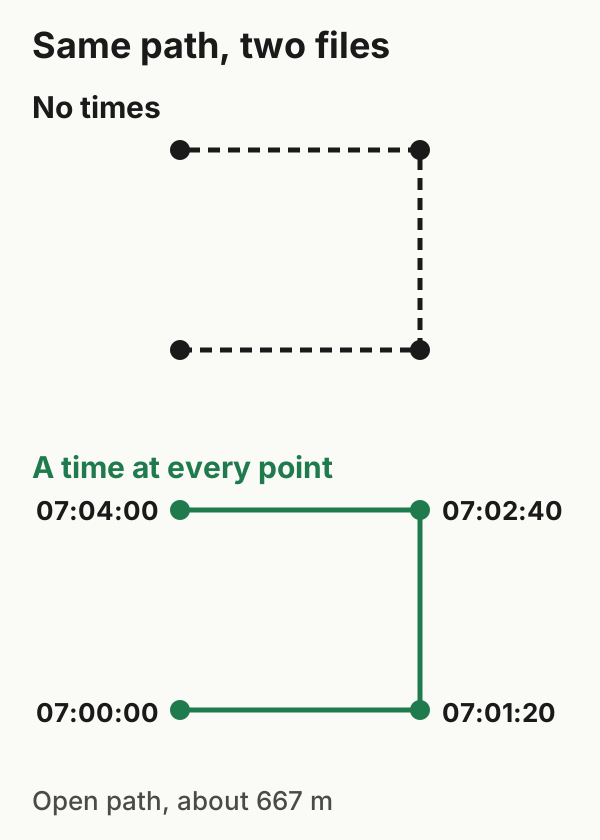
With times, an app can work out speed, elapsed time and segment efforts. Without them, the file can still hold elevation, sensor values or summary data, but timing-based figures such as speed and splits can't be reconstructed from the path alone. Neither tells you whether anyone actually covered the path. Both files here are synthetic and their times are invented, which is exactly the point. A time on every point shows that the file has timing, not that the timing came from a real workout. And a file without times may be a planned course, or a recording whose times were removed somewhere along the way.
GPX 1.1 makes time optional on track points, so missing times alone don't break the format. These two files have been checked only as well-formed XML; schema validation is still to be done.
Why Strava rejects a file without times
Strava's upload specification requires a time with every trackpoint or record. Certain strength-training files are exempt, but that doesn't apply here. Its help page on the error says such a file "likely contains only GPS data", and that timestamps are needed to calculate speed and segment times. Strava names two typical sources: GPX downloaded from other people's activities, and GPX exported from MapMyFitness sites.
Strava's suggested remedies don't include adding times. It mentions asking a training partner for their own export, but their file records their workout, not yours. You can use their path as a route, and for your own record, Strava suggests creating a manual activity with your real details. Meeting the time requirement is one condition of an upload; it doesn't guarantee the file will be accepted.
Why writing in times is the wrong fix
Some tools can write a time onto every point of a path, for example by spreading a chosen duration evenly along it. Every speed, split and segment time in the result would be invented. If you did the workout but have no recording with real times, a manual activity with your real duration is the honest record.
Look for the original instead. The device or app that recorded the workout may still have it, or the person you trained with may have their own. Not every original will have usable times, because timing can be lost in that copy too, so check it with the same eye.
Using a course for what it's for
If you want a path on your watch or bike computer to follow, import it as a course rather than an activity. Garmin, for example, documents course import into Garmin Connect from .fit, .gpx and .tcx files. On the web the path is Training & Planning → Courses → Import; in the phone app, you open the file and choose Garmin Connect (Garmin: importing a third-party course). Other platforms have their own route or course import.
| What you know about the file | Treat it as | Next step |
|---|---|---|
| You drew or downloaded it as a route | A course | Import as a course, with or without times |
| It came from your own recording device or app | Your recording | Upload or keep it; if times are missing, look for an earlier copy from the source |
| It came from someone else's activity | Their recording | Use the path as a course; for your own record, log a manual activity |
| Origin unknown | Unverified | Don't present it as your workout, whatever timing it contains |
If you recorded the workout yourself, on an Apple Watch or another device, go back to that recording rather than to a route file, and check any export from it for times.
Example files: format and limits · SHA-256 checksums.