What your shared workout file can reveal
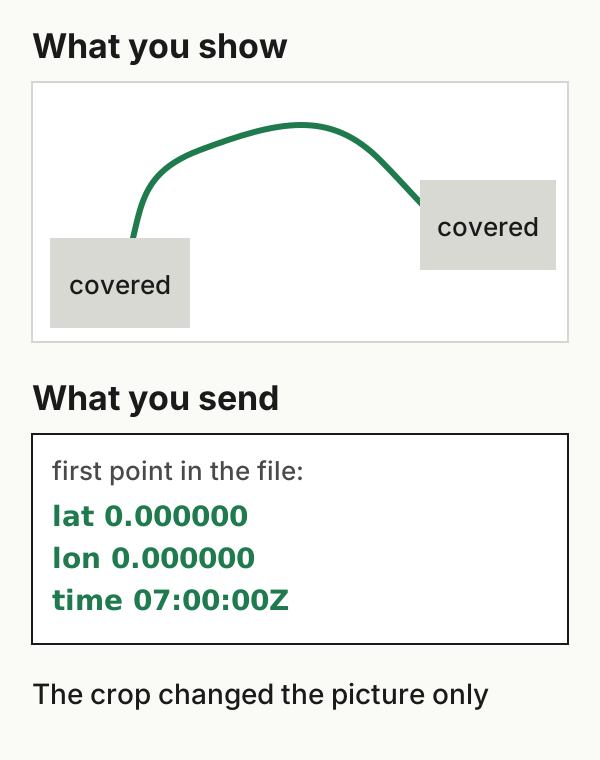
A workout file contains whatever its exporter wrote into it, regardless of how the map looks elsewhere. Hiding the start of a map on Strava changes what other athletes see on Strava, and cropping a screenshot changes the picture. Neither edits the GPX or FIT file you send to a coach, a friend or a forum. A file can leave out some of the original recording and still contain a private start or end point. Before sharing it, open it and look at what's actually there.
What hiding a map does and doesn't do
Strava's map visibility controls are for its own activity pages. Strava says the first and last 200 metres of future activities are hidden by default after your first upload. You can hide more, or the whole map, for one activity or by default, and hidden portions remain visible to you (Strava map visibility).
Strava also states the limits. The controls "apply specifically to activities on Strava and are not shared to other services", and hiding part of a map doesn't make a hidden location impossible to work out. The page doesn't say whether exported files are trimmed, so check any file you export before assuming they are.
What a file can contain
Here is the start of a synthetic GPX file written for this article. It uses invented coordinates in open ocean and isn't from any person, device or exporter. It uses the GPX 1.1 namespace, and heart rate is in Garmin's TrackPointExtension namespace. This excerpt shows one track point; the full file has five.
<gpx version="1.1" creator="Synthetic example …"
     xmlns="http://www.topografix.com/GPX/1/1"
     xmlns:gpxtpx="http://www.garmin.com/xmlschemas/TrackPointExtension/v2">
  <metadata><time>2026-10-12T06:58:40Z</time></metadata>
  <trk>
    <name>Morning Run</name>
    <trkseg>
      <trkpt lat="0.000000" lon="0.000000">
        <ele>2.0</ele>
        <time>2026-10-12T07:00:00Z</time>
        <extensions><gpxtpx:TrackPointExtension>
          <gpxtpx:hr>96</gpxtpx:hr>
        </gpxtpx:TrackPointExtension></extensions>
      </trkpt>
      …
Go through your own file the same way:
| Look at | What it can reveal |
|---|---|
| The first and last track points | The first and last positions in that file, which may be near home or work even if the recording began elsewhere |
A <time> on each point |
When you were where, including day and time of day; several files can reveal a routine |
| Heart rate or other sensor values | Health-related data about you |
creator, <name>, <metadata> |
The app or device that made the file and the activity's title, which may include a place |
A FIT file is binary, so a text editor won't show it. It can hold the same coordinates and times, plus device details. Use a FIT viewer or decoder to see which fields your file contains.
What you download from a service may differ from what you uploaded. Strava says Export Original returns the file as it was uploaded, and that Export GPX includes GPS coordinates, timestamps and sensor data such as heart rate (Strava export instructions). Neither description mentions applying your map visibility settings.
Choosing what to send
Ask what the recipient needs:
- Pace, splits, heart rate or power for a coach. These come from the samples, not from where you started. Consider whether a summary, or an activity link with your visibility settings applied, would do instead of the file.
- A route for someone to follow. A course drawn from a public starting point, without your times or sensor data, may be enough.
- A public post or forum thread. Share a picture rather than a file, and check that the picture doesn't show the start, street names or a revealing title.
If you remove the start and end from a file, use an editor you trust, then open the result and check everything left in it. Trimming points doesn't necessarily update everything else: summary distance, duration, metadata times or the activity name can still describe the full workout. Look at the remaining points, every summary field and the metadata before sending. Keep the untrimmed original privately.
Files from WorkoutPort
WorkoutPort exports what it can read from Apple Health for a workout, which can include route points, times and sensor readings. Don't assume an export holds everything the original recording did, and don't assume it's safe to share. Treat any route or metric data in it as potentially sensitive, and inspect the file before sharing it beyond the person or service you meant it for. Don't assume any export has been trimmed or redacted: open the saved file and check it.
Example files: format and limits · SHA-256 checksums.