Why workout distances change after upload

When the same workout shows two distances, find out where each number could have come from before deciding which is right. A file can carry a distance recorded by the device, or an app can calculate one from the GPS points. Strava says it uses the distance data recorded in the file. It calculates distance from GPS coordinates for an uploaded file that has no distance stream (Strava: how distance is calculated). Two apps reading the same workout can therefore start from different inputs.
Three numbers for one fictional route
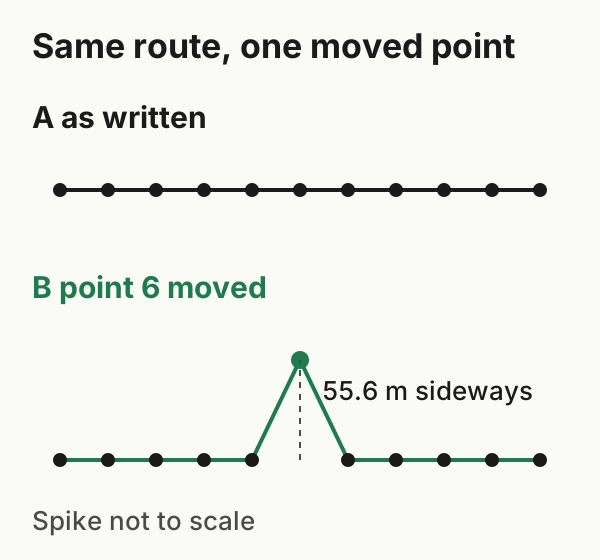
The route below is invented: eleven points 0.001° apart, running due east along the equator in open ocean. The figure shows it as written and with one point moved. You can download both versions (moved-point version), along with a point table and a short script that adds up the segments.
| Distance | Total | How it was obtained |
|---|---|---|
| A hypothetical device or summary total | 1,150 m | Invented for this example and deliberately different from the track. Neither downloaded GPX contains it |
| Calculated from route A | 1,112.0 m | Haversine sum of point-to-point distances, Earth radius 6,371,008.8 m |
| Calculated from route B | 1,138.2 m | Same method, point 6 moved 0.0005° north (55.6 m) |
Imagine a device had reported 1,150 m for this route and an app displayed that total, while another app calculated from route A's points and showed about 1,112 m. The downloadable files contain only the points, so the 1,150 m figure exists only in this example's text. Those are different calculations on different inputs, and both are arithmetically correct here. In a real workout, a gap like this may still come from an error somewhere, so it's worth checking.
Moving one point adds 26.2 m. The track now has a spike: out 55.6 m and back. A detour like this can only lengthen a calculated distance, because it replaces a straight segment with two longer ones.
The formula's inputs matter too. Using the same eleven points with an Earth radius of 6,378,137 m instead of 6,371,008.8 m gives 1,113.2 m rather than 1,112.0 m. The included script reproduces both if you pass the radius. A metre or two can come from method choices alone. None of this measures GPS accuracy or reproduces how Strava or any other service calculates internally.
What can change the number
Whether the file has a distance stream. FIT and TCX files can carry cumulative distance. GPX can too, through extensions, but often doesn't. Strava's upload specification lists a distance extension among those it reads from GPX. Export the same workout in two formats and the destination may receive a device distance in one and have to calculate its own for the other. Our file-export test shows one GPX case.
Stuck or stray points. Strava says device-built distance can suffer from "stuck points", where no extra distance is recorded, and that recalculating from GPS can remove that. Stray points push a calculated distance the other way.
Straight lines and flat ground. Strava notes that GPS-based distance assumes a flat surface and joins points with straight lines rather than arcs. On a curving route, some distance between sparse points is lost.
Sensors other than GPS. For bikes, Strava describes wheel-sensor distance as wheel revolutions times circumference. It says this captures some of the effect of elevation, but is sensitive to a wrong wheel size.
Checking a transfer
Send one workout whose route you know, then compare three things: the source app's total, any distance field in the file that was actually sent, and the destination's total. If the destination matches the file's field, the two are consistent, but that doesn't prove the destination used that field, because a calculation can land on the same number. If they differ, check whether the file had a distance stream at all, and look at the map for spikes. A difference doesn't point to any single cause on its own.
Totals can also differ before the upload. Depending on the sport and the data available, a WorkoutPort export may use Health's distance samples or distance derived from other data, and a GPX export may carry no distance total at all. Don't assume the total shown in Health is the one the destination receives: inspect the file that was actually sent, and compare it with the destination's result.
If one point is obviously wrong, Strava's website has Correct Distance in the activity's three-dot menu. Strava says it removes outlier GPS points, and you can revert it by selecting it again. Use it for an activity with a visible spike, not to make two apps agree.
For a whole history, record these comparisons in the small-batch migration check.
Example files: format and limits · SHA-256 checksums.