Why your Strava activity has the wrong date or time zone

A workout shown on the "wrong" day may be the right instant displayed in a different time zone, or an instant that really is wrong. Before changing anything, find out which. Workout files store moments in time, often in UTC, and each app turns them into a local time for display. If the file's instant is correct, the fix belongs in the display: your profile's time zone, or the zone a service applies to the activity. Change the data only when the instant itself is wrong, and keep the original first.
One instant, two calendar dates
Take a workout that started at 22:45 UTC on Saturday 20 June 2026. In New York (UTC−04:00 that day) it started at 18:45 on Saturday. In London (UTC+01:00) it was 23:45 on Saturday. In Tokyo (UTC+09:00) it was 07:45 on Sunday 21 June.
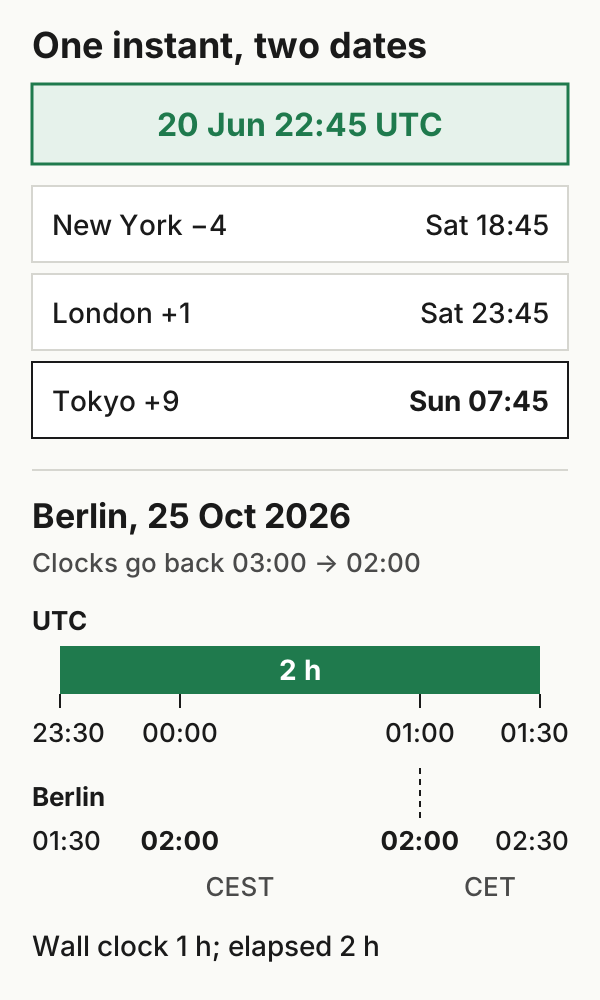
All three are the same workout. If you trained in London and a service displays the activity in your profile's time zone, a profile set to Tokyo would show it on Sunday. A service that uses the activity's GPS location may show the London time instead. The offsets apply to this date: New York and London are on summer time in June, and their offsets change in winter. All the conversions here, and the midnight and clock-change examples below, are in a downloadable CSV.
How a file records the instant
In a GPX file, a time can look like 2026-06-20T22:45:00Z. The Z means UTC. Some exporters write an explicit offset instead, such as +01:00. Either way, the text identifies one instant.
FIT files count seconds from a fixed starting point, which Garmin calls the FIT epoch: midnight UTC on 31 December 1989 (Garmin: working with dates). Our example instant is 1,150,929,900 in FIT seconds and 1,781,995,500 as a Unix timestamp. The difference, 631,065,600 seconds, is exactly the offset Garmin documents between the two epochs. That's a useful check if you decode a file yourself.
A FIT activity can also carry a local timestamp. Garmin's decoding guide says the difference between it and the UTC timestamp gives the activity's time-zone offset. Not every manufacturer includes it. When it's missing, Garmin says software commonly looks up the time zone from the first GPS position, and a workout without GPS has no position to look up.
When there's no location, Strava uses your profile
Strava says that for activities without GPS data, it uses the time zone on your profile when the file doesn't include time-zone information (Strava: wrong date or start time). An indoor workout recorded while you're travelling can therefore appear in your home time zone.
Strava's suggested fix is to correct the location on your profile. If that doesn't take effect, it suggests briefly switching to another location, saving and refreshing, then setting your real location again. Strava says this fixes future uploads only.
Crossing midnight
A run that starts at 23:40 in Berlin on Friday 10 July 2026 (21:40 UTC) and lasts 45 minutes ends at 00:25 on Saturday 11 July. Where it appears depends on the app. In this example, and in a weekly log you keep yourself, we count it on the start date, Friday. Check which date your destination uses before deciding it's wrong.
The clock change: an hour that happens twice
On Sunday 25 October 2026, Europe/Berlin moves from CEST (UTC+02:00) to CET (UTC+01:00): at 03:00 local time, clocks go back to 02:00.
A fictional night ride starts at 23:30 UTC on 24 October, which is 01:30 CEST on 25 October. It lasts two hours and ends at 01:30 UTC, which is 02:30 CET. On a wall clock it ran from 01:30 to 02:30 and looks like one hour, but it lasted two. Subtracting local clock readings gives the wrong duration; subtracting the UTC instants gives the right one. The ride's UTC start date is 24 October, while its local date is the 25th.
If a duration looks an hour off near a clock change, check how it was calculated before suspecting the recording.
Before you change anything
Strava says the only way to fix the timestamps of an existing activity is to upload it again, and that deleting the original removes its kudos, comments and photos. A new upload isn't guaranteed to be accepted, either. So:
- Decide whether the instant or the display is wrong. Convert the file's start to the time zone where you trained. If the result matches what you remember, that start timestamp is consistent, and the issue is likely your profile or the zone the service applied. That check covers the start time only, not the rest of the file.
- Fix the profile first. It affects future uploads and leaves existing activities alone.
- If an existing activity really needs new timestamps, save the original file and anything attached to the activity that you want to keep. Then read Strava's current instructions and decide knowing that deletion can't be undone. Don't shift timestamps by hand to move a workout to another day: that changes the instant, and any app that reads the file correctly will then show it wrong.
For a whole history, time-zone checks belong in the small-batch migration check.
Example files: format and limits · SHA-256 checksums.