Why your uploaded workout has no map
An activity on Strava without a map has one of two problems. Either the route data never became available to Strava, or the route is there and hidden from whoever is looking. For the first, work from the recording outward: the source, then the uploaded file. Stop at the first place where you can confirm the route is absent, or where you can't inspect any further. A stage you can't inspect isn't proof that the route was lost there. For the second, check what each viewer sees before changing anything. Each case has its own remedy.
If the whole activity is missing from Strava rather than just its map, start instead with why a Health workout doesn't reach Strava.
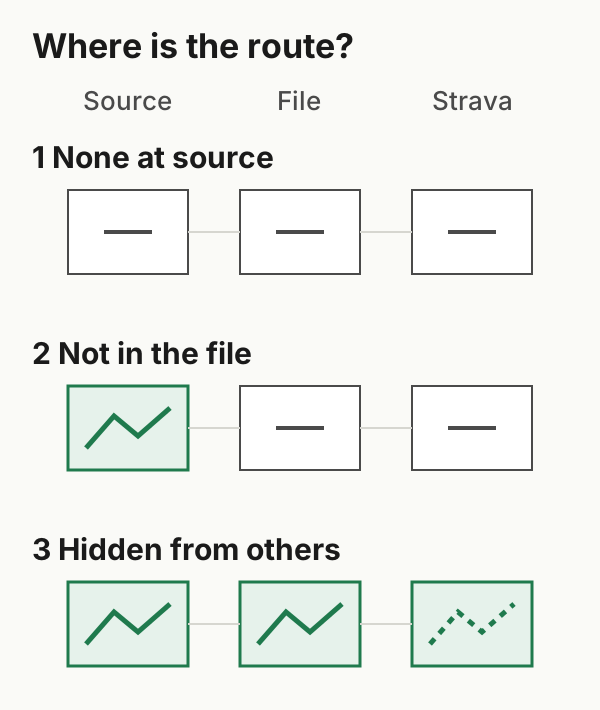
Case 1: no route available at the source
Open the workout in the Fitness app, or in the app that recorded it, and look for its map. Indoor rides, treadmill runs and gym sessions normally have none.
For an outdoor workout, a missing map there isn't proof that no route exists. The app may simply not be showing it, or it may not have permission to read it. Check the recording app's own export or settings and the route permissions described in case 2. If location wasn't recorded at all, nothing downstream can supply it. Strava's Apple Watch help says that data missing from an upload, GPS included, can't be added to that activity later. Data missed because permissions were off appears only in activities uploaded after the permissions are turned back on (Strava Apple Watch app).
Remedy: check location permissions on the device you record with before the next outdoor workout. Don't attach a route you didn't record, such as a planned course, as if it were this workout's.
Case 2: a route at the source, but not in the upload
If the Fitness app shows a map and Strava doesn't, look at two things.
Route permission. Health treats workout routes as separate data, so an app can read a workout without being able to read its route. Strava's Health setup asks you to enable "Workouts & Routes" (Apple Health and Strava). Any other transfer app needs the equivalent permission. You can review it in Health: tap Summary, then your picture or initials, then Apps (Apple: sharing Health data).
What the uploaded file contained. On the Strava website, Export Original returns the file as it was uploaded (Strava export instructions). Open a GPX file in a text viewer and look for <trkpt> elements with lat and lon. A FIT file is binary and needs a FIT viewer or decoder.
| You find in the original file | What it shows | Next step |
|---|---|---|
| Track points with coordinates | The upload contained route data | Keep the file; look at how the destination handled it |
| A track with no points | This file has no track points | Check route permission and the exporter; the file alone doesn't say why |
To see the difference, compare our two synthetic practice files: one with track points and one with an empty track.
Fixing a permission affects future transfers. It doesn't update an activity already on Strava. Sending the same workout again may be rejected as a duplicate, because Strava says it doesn't allow duplicates. Strava also says deleting an activity removes its kudos, comments and photos (Strava: wrong date or start time). Before deciding anything, keep the original recording and file. Then check Strava's documented options for the activity, and treat any deletion as a choice with consequences, not a routine step.
WorkoutPort sends route data when it can read it from Health. It handles an outdoor workout whose expected route is missing differently from a strength session that never had one.
Case 3: the route is on Strava, but hidden
If you can see the map on your own activity but friends can't, nothing is missing. Strava's map visibility controls hide part or all of a map from other people. Strava says the first and last 200 metres of future activities are hidden by default after your first upload, and that greyed-out portions are visible only to you (Strava map visibility). On a short activity, that default can hide most of the route from others.
Ask whoever reported the missing map what they see. If only other people are affected, check the activity's three-dot menu → Edit Map Visibility, and your defaults under Settings → Privacy Controls → Map Visibility. Change them only if you want more of the route public.
What doesn't help
- Stitching in a planned course or someone else's GPX. A planned path doesn't record where you went.
- Retrying the same upload repeatedly. If the file has no coordinates, it can't supply a route, and the destination may reject it outright. Check the file first.
- Reading a distance as proof of GPS. A workout can have a distance without having a route available to export.
If you record outdoor workouts with an app whose own Strava connection carries the route, that connection may be the more direct path.
Example files: format and limits · SHA-256 checksums.