Keep cycling power and cadence when you move a ride
To keep power and cadence when you move a ride, send a recording that actually contains them, in a format and with field names the destination reads. Keep the original file from the bike computer or recording app, and check it before anything else. Each reading should have a timestamp, recorded zeros should still be zeros, and absent readings should still be absent. If the original lacks the data, no later conversion can add it back.
Start from the original
Every conversion can drop a field. If the ride is on Strava, Export Original on the website returns the file in the format it was uploaded in, often FIT. Strava describes FIT as able to hold sensor data, course points, workout instructions and device settings (Strava export instructions). Strava's Export GPX is a different file. Strava says it includes heart rate, cadence and temperature, and power only when a power meter recorded it, not estimated power.
Keep the original as it is. If the destination doesn't accept that format, choose one whose power and cadence fields the destination documents that it reads, and keep the original alongside the converted copy.
Audit one stretch of a ride
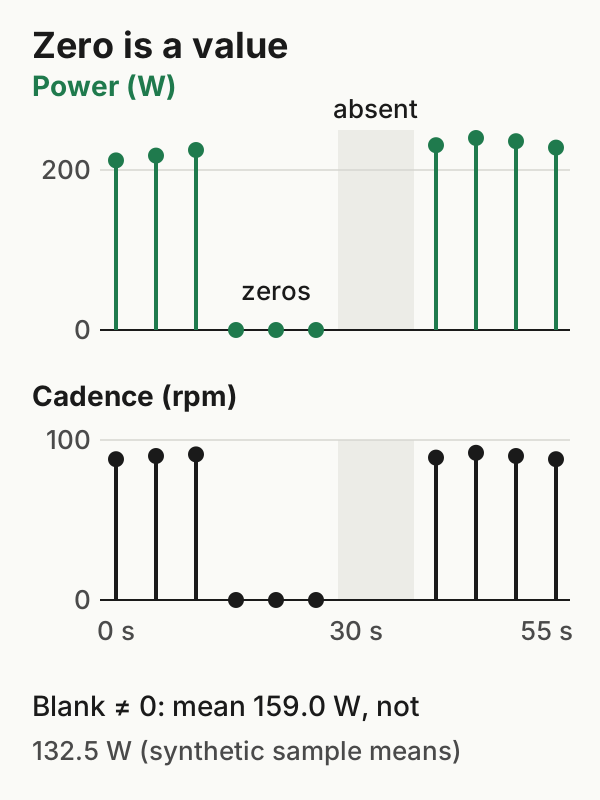
Here is a short synthetic excerpt with a reading scheduled every five seconds. In this invented example, the rider pedals, then coasts for three readings, which are recorded as 0. The next two scheduled readings are absent, and then pedalling resumes. The example defines those meanings. In a real file, a zero can sometimes stand for a dropout, and blanks have their own causes, so read the values alongside what you know about the ride. The readings are in a downloadable CSV.
1. A timestamp on every reading. A summary such as average power is useful on its own, but keeping the power and cadence time series requires each reading to be tied to a moment in the ride. In a FIT file, they're fields on record messages, each with its own timestamp. Garmin's FIT decoding guide notes that the fields present in record messages can change during a recording, for example when a sensor pairs after the start. Check the whole file, not just the first records. FIT is binary, so you need a FIT viewer or decoder to inspect it.
2. Recorded zeros. The three zeros here are part of the data. They belong in any mean you calculate from the readings.
3. Absent readings. The two blanks are not zeros. With the blanks left out, the mean of the listed power readings is 159.0 W. Counting the blanks as zero gives 132.5 W, which describes nothing that was measured. The mean of only the non-zero readings is 227.1 W, an answer to a different question. All three are simple means of the listed readings. A device or service may report a time-weighted average or apply its own rules to zeros and gaps, so its figure can differ from all three.
4. Field names the destination reads. Strava's upload specification says it reads power from a FIT file's records, and from a power element in a general GPX <extensions> block. In TCX, it reads the trackpoint extension's watts value (in Garmin's schema the element is Watts, in its activity-extension namespace, and XML tag names are case-sensitive). The Garmin TrackPointExtension that Strava lists for GPX covers heart rate, cadence and temperature, but not power. A field or format that isn't on a destination's list is unverified for that destination, not necessarily unsupported. Test one ride before relying on it.
| In the original you find | Next step |
|---|---|
| Power and cadence on most records, with timestamps | Send this file in a format the destination documents for those fields |
| Zeros during known coasting | Keep them; don't "clean" them out |
| Absent readings | Leave them absent; don't fill with 0 or interpolate |
| No power field anywhere | Look further back: the device or its companion app's export |
When the Watch has your heart rate and the computer has your power
If you record a ride on an Apple Watch for heart rate and on a bike computer for power, uploading both doesn't combine them. Strava says heart rate from another device or service, "such as Apple Health", can't be merged into an existing activity (Strava heart-rate help). Pick the recording whose data matters most for each destination and give it one path there. The Watch and bike-computer guide covers that choice. If the computer can record heart rate from a chest strap, one file can hold all three.
WorkoutPort transfers what it can read from Apple Health. It doesn't merge a Watch heart-rate stream into a bike computer's power file. If a bike computer's rides reach Health without their power readings, WorkoutPort can't send power it can't read. In that case, the computer's own export or direct connection is the better path.
After the transfer
Open the ride at the destination and look at the power chart around a known coast and a known gap. A chart that draws a line across a gap doesn't prove the stored values were filled. A chart's drawing and the data behind it are different things, so check the activity's exported data where you can.
If the destination's average power differs from your own mean of the original, the difference may come from weighting, sample windows, how zeros and gaps are treated, or a summary field in the file. Investigate before concluding data was lost.
For a broader comparison of what FIT, GPX and TCX kept for one sample ride, see our file-export test.
Example files: format and limits · SHA-256 checksums.