Elapsed, timer and moving time: why Strava shows a different pace
A workout has more than one duration, and each gives a different pace. Elapsed time is the wall-clock span from start to finish. Timer time leaves out the periods when the timer was paused. Moving time goes further and leaves out stops a service detects while the timer kept running. Strava generally shows moving time and pace based on it. For runs, it says it uses your own pauses when the file contains them, and estimates rests only when you never paused (Strava: moving time, speed and pace).
So when Strava's time differs from your watch, first work out which clock each one shows. The numbers can legitimately differ without either being wrong.
One run, worked through
This 6.00 km run is invented to make the arithmetic visible. The runner pauses the workout for four minutes to talk to a neighbour, and later waits two minutes at a crossing without pausing.
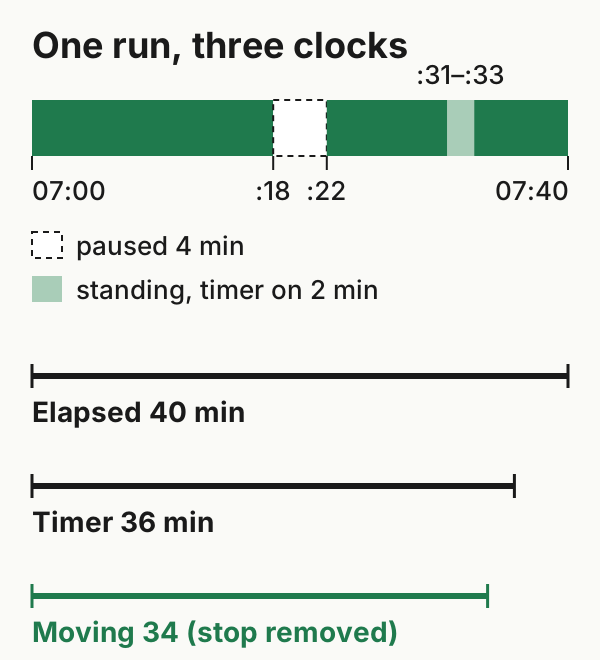
The segments are in a downloadable CSV. The three durations follow from them:
| Clock | Calculation | Duration | Pace over 6.00 km |
|---|---|---|---|
| Elapsed | 07:00 to 07:40 | 40:00 | 6:40 /km |
| Timer | 40 − 4 min paused | 36:00 | 6:00 /km |
| Moving | 36 − 2 min stopped with the timer running | 34:00 | 5:40 /km |
The distance is the same in every row. Only the denominator changes, and with it a full minute of pace per kilometre. The FIT file format makes the same distinctions. Garmin's FIT cookbook defines elapsed duration as wall-clock time, timer duration as time while the device timer runs, and moving duration as running-timer time during which the person was moving. The moving row here is one defined example of removing a stop, not a model of how any service detects stops.
What Strava's documentation suggests for this run
For runs, Strava's help says that when you use the pause button, it reads moving time from the device rather than calculating its own. It also says that if a file contains any pause events, its server won't remove any additional resting time. If this run's file recorded the four-minute pause as a pause event, the documentation points to 36:00 and 6:00 /km on Strava, and the two minutes at the crossing would stay in. That's an inference from the documentation, not an observed result, and it depends on how the pause is represented in the file Strava receives.
If the run had no pause at all, Strava says it would calculate moving time from GPS data using a speed threshold. It doesn't publish the threshold, so this example can't predict whether the crossing would count as rest.
Strava documents two more cases:
- Races use elapsed time. For a run tagged as a race, Strava uses elapsed time "since all stops count toward your race time": here, 40:00 and 6:40 /km.
- Some sports use elapsed time. Strava lists weight training and yoga among them.
Rides work differently
For rides, Strava says it uses the recorded GPS data to calculate its own moving time. A poor GPS signal can make you look as if you were moving when you weren't. If the same timeline were an 18.00 km ride, the three clocks would give 27.0 km/h (elapsed), 30.0 km/h (timer) and 31.8 km/h (moving, if the stop were removed). Which figure Strava shows depends on its GPS-based calculation, which documentation alone can't reproduce. Compare a ride's averages with other rides measured the same way.
Checking a transferred workout
- Compare elapsed time first. If the start and end instants match, elapsed time matches, but that confirms only that duration. Route, sensor streams and other fields still need their own checks.
- A different elapsed time is a data question, not a display one. Converting to another time zone can't change a duration. If elapsed time differs, compare the original's start and end timestamps, its pause events and summary fields, and any edits made after upload. One display trap to know about: subtracting local wall-clock times across a daylight-saving change gives the wrong answer. The duration is still correct; the subtraction isn't.
- Look for pauses in the file. A FIT activity can record timer stops and starts as events. Its session summary carries total elapsed time and total timer time, which Garmin says are required in activity files. If a transferred file has no pause events, the destination can't read your pauses from it. Depending on the service, it may rely on summary fields or its own rest detection.
- Pause consistently. Strava's advice for runs is to pause the same way every time, so your moving time is always measured the same way.
Example files: format and limits · SHA-256 checksums.